Enable the extension
Turn it on only when you want to configure new course data.
 onvista Stock URL Finder
Free Chrome extension
Copy the course URL and required JSON paths directly from OnVista into Portfolio Performance—without manually searching network requests.
Fewer detours
The extension detects new chart requests and displays the course URL and JSON paths in a clear dialog. Copy them into Portfolio Performance and continue.
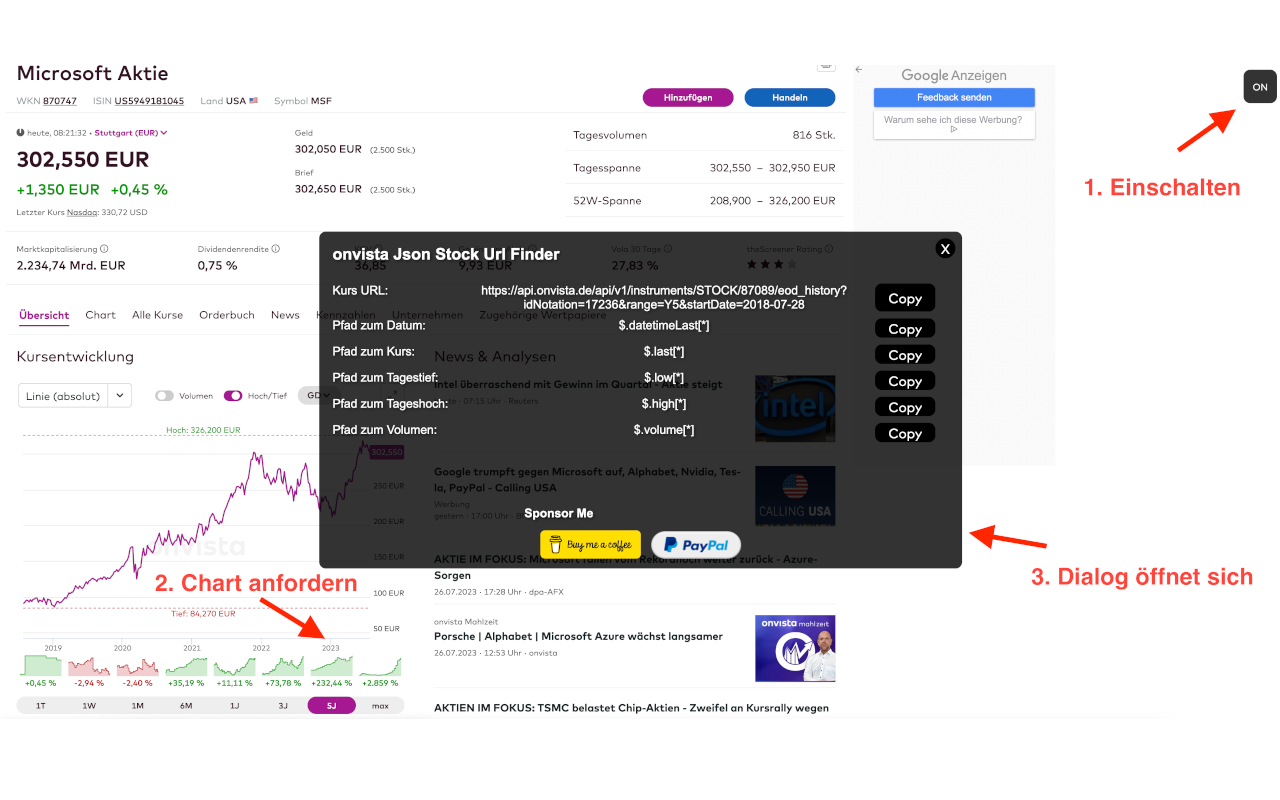
Three simple steps
Turn it on only when you want to configure new course data.
Select the security, exchange, and time range you need.
Transfer the URL, date path, and course path into Portfolio Performance.
Matching data
The course data reflects the selected exchange. The start date in the URL is checked against the chart request.
"url": "https://api.onvista.de/...""datePath": "$.datetimeLast[*]""closePath": "$.last[*]"No developer tools and no manual hunt for the correct request.
Transfer the displayed values directly into Portfolio Performance.
Local and transparent
No data collectionThe extension does not collect, sell, or transfer personal data.
No accountInstall and use it without registration.
Open sourceInspect the implementation on GitHub.
Frequently asked
The detected course URL plus the date and course paths needed for historical JSON data in Portfolio Performance.
Yes. The displayed course data reflects the exchange selected on OnVista.
No. Use the switch to enable it only when needed.
No. The Chrome Web Store disclosure states that no user data is collected or used.
Get the OnVista values Portfolio Performance needs directly in Chrome.
+ Add to Chrome — it’s freeQuestions or compatibility issues?
Ask questions, report bugs or suggest features in this extension’s support hub. Include your Chrome version, extension version and a description of the problem.
Support posts may be public. Do not include passwords, session tokens or private content. For confidential inquiries, use the developer contact details shown in the store.
Open Chrome Web Store support ↗