Across displayed lists
Filter keeps matching tasks in their original lists. Results collects actual title matches in a separate scrollable list while leaving Google’s tasks visible.
 Google Tasks Filter
Free Chrome extension
Search loaded Google Tasks by title. Choose Filter to narrow the original view, or Results to collect matching tasks with their list names.
Version 0.5.3 is available in the Chrome Web Store.
Inside your familiar workflow
Open Google Tasks and click the search icon beside Google’s help button. A header search field updates matches as you type, with no Enter required. View controls, the count and results appear in a dropdown directly below it, overlaying the tasks. The task viewport stays in the same position and size, with no dimming or blur. In narrow windows the search field also appears inside the dropdown. Switch between Filter and Results without losing your query. Results show each task title and list name. Click a result or press Enter to close search and jump to the original task. The × clears the query; another icon click, the back arrow or Escape closes search while retaining the query. An active filter marks the icon blue. While search is open, actual matches in the original lists have subtle blue inset frames drawn above the visible task surface. After a result jump, only the target task remains marked with a stronger frame and side accent, for eight seconds or until you press Escape. Another jump replaces the previous target mark.
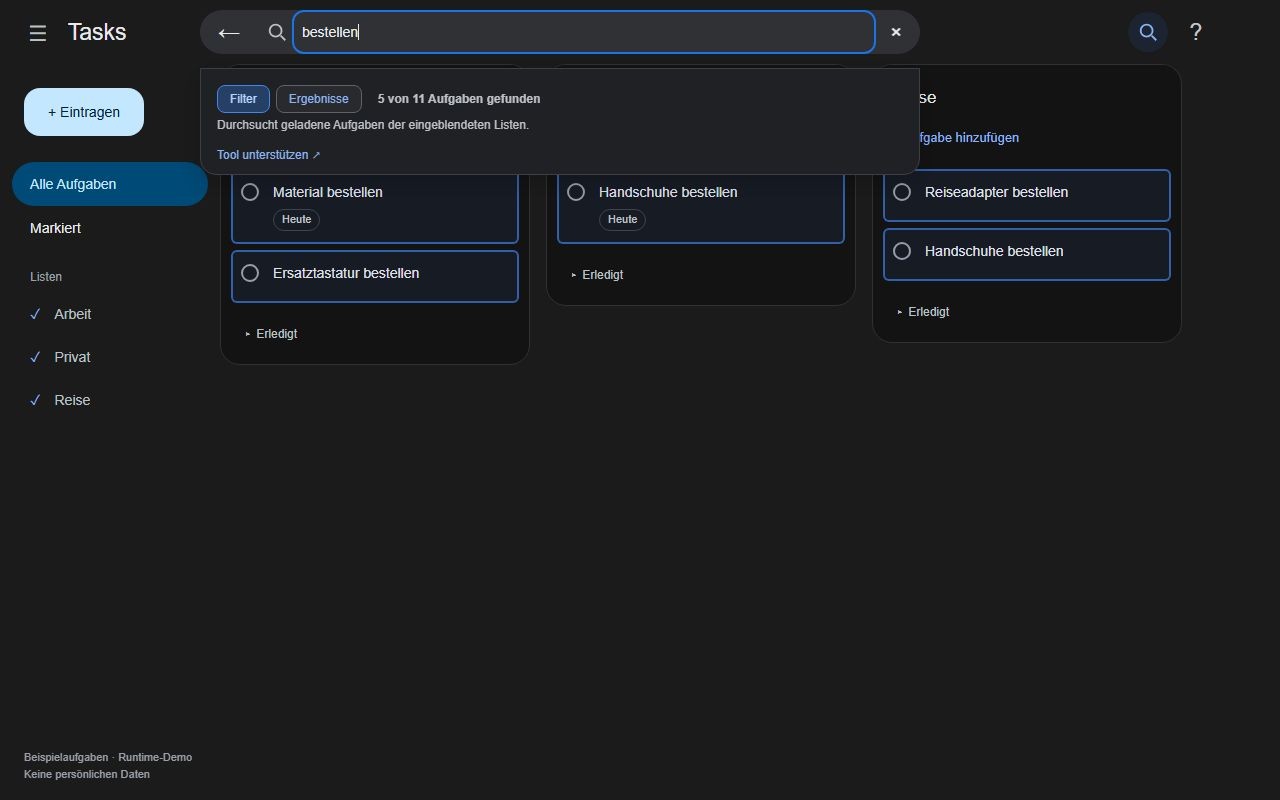
Filter keeps matching tasks in their original lists. Results collects actual title matches in a separate scrollable list while leaving Google’s tasks visible.
Loaded tasks and title changes update both views. Tab reaches the search controls and results as well as the task page; Escape closes the search bar when focus is inside it. Search text and view mode are not saved.
Search only changes the local view. Jumping to a result does not edit, complete or delete it; those actions remain in the original Google Tasks row.
No. Version 0.5.3 searches loaded tasks in displayed lists. Open completed sections and scroll to load more tasks when needed. Hidden lists and unloaded tasks are not included.
This version filters task titles only. Multiple words are treated as a continuous phrase, and special characters are matched literally.
The extension relies on the Google Tasks page structure. Recognized structural failures pause filtering and restore hidden rows. Compatibility updates may be necessary.
Privacy by design
No developer accessTask titles and search terms are processed locally and are not sent to the developer.
No persistent search storageNo extension storage, cookies or analytics. Reloading starts a fresh search.
Full privacy policy →Now available
Keyboard shortcut fix in 0.5.3: Typing in extension search no longer triggers Google Tasks shortcuts such as C or L. Tab, Enter and Escape remain available. Update the extension and reload Google Tasks to activate the fix.
Install the free extension from the Chrome Web Store and open Google Tasks. Use the search icon to filter loaded tasks or browse them in a results list.
Chrome Web Store support ↗Use Store support for questions and bug reports. Do not post private tasks, passwords or session tokens.
Voluntary support
All features are free. You can support maintenance voluntarily. Contributions do not unlock features.